 voctomix
Composites and Transitions
A composite is a layout that places up to two sources (A and B) into the output frame. A transition is an animated fade between two composites. voctomix interpolates key frames using B-Splines to produce smooth motion.
Built-in composite types
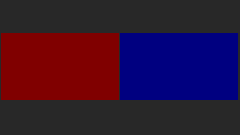
Source A is shown in red, source B in blue in the diagrams below.
- Single-source composites — c(A) / c(B)
One source fills the whole frame; the other is not rendered.


- Two-source composites — c(A,B)
Two sources share the frame. Available layouts:


fullscreen — one source at full size, the other invisible
pip (picture-in-picture) — B overlaps A in a small window; an overlapping composite because B’s frame covers part of A
sbs (side-by-side) — A and B share equal halves
sbsp (side-by-side-preview) — a wide main view beside a narrow preview
Configuring composites
Composites are defined in the [composites] section using the form
<name>.<attribute> = <value>.
[composites]
; source A fills the whole frame, B is invisible (alpha=0)
fullscreen.a       = 0/0/1920/1080
fullscreen.alpha-b = 0

; side-by-side: equal halves
sidebyside.a = 0/0/960/1080
sidebyside.b = 960/0/1920/1080

; picture-in-picture: B overlaps A in the bottom-right corner
pip.a = 0/0/1920/1080
pip.b = 1440/810/1920/1080
Frame attributes (prefix with composite name and dot):
<name>.aPosition and size of source A as a
RECT. Default: no output (invisible).<name>.bPosition and size of source B as a
RECT. Default: no output (invisible).<name>.crop-aCropping borders of frame A as
CROP. Default: no cropping.<name>.crop-bCropping borders of frame B as
CROP. Default: no cropping.<name>.alpha-aOpacity of source A as
ALPHA. Default:255(opaque).<name>.alpha-bOpacity of source B as
ALPHA. Default:255(opaque).<name>.noswapAny non-empty value prevents this composite from being targeted as a swapped composite (
^c). Default: swap allowed.<name>.interMark as an intermediate composite, hiding it from the UI. Default:
false.
RECT — rectangular coordinates in any of these formats:
X/Y WxH— pixel coordinates, e.g.10/10 100x100POS WH— float proportions, e.g.0.4 0.2X/Y WH— mixed, e.g.0.1/10 0.9*— full screen (uses thesizefrom[output])
Both X, Y, W, H can be integer pixels or float proportions
(0.0–1.0 relative to the output frame).
CROP — cropping borders in any of these formats:
L/T/R/B— four individual values, e.g.0/100/0/100LR/TB— two symmetric pairs, e.g.0.0/0.2LRTB— single value for all sides, e.g.0.1(10% from each border)
ALPHA — transparency as integer 0–255, float 0.0–1.0,
or * (opaque).
Transition use cases
voctomix handles all pairwise transitions between configured composites. The following cases cover the full space:
- c(A) ↔ c(B) — swap full-screen source
Both sources cross-fade by blending their alpha channels.


- c(A) ↔ c(A,B) — introduce a second source
The incoming source slides or fades into the frame.



- c(B) → c(A,B) — bring in A alongside B
The hidden source A is introduced into the frame while B remains visible.



- c(A,B) ↔ c(B,A) — swap sources within a composite
An animation moves both sources to their new positions. For overlapping composites (e.g. pip), the z-order must be flipped mid-transition. Insert a non-overlapping intermediate composite (e.g. sbs) so the flip can happen cleanly — see the Phi (Φ) operation described under Auto-generated transitions.

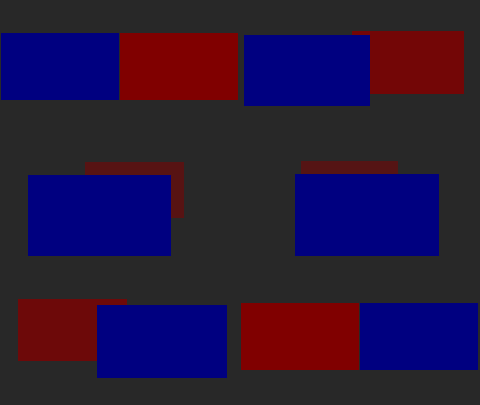

- c₁(A,B) ↔ c₂(A,B) — change composite layout
Sources animate to their new positions; A and B remain unswapped so no z-order flip is usually needed.
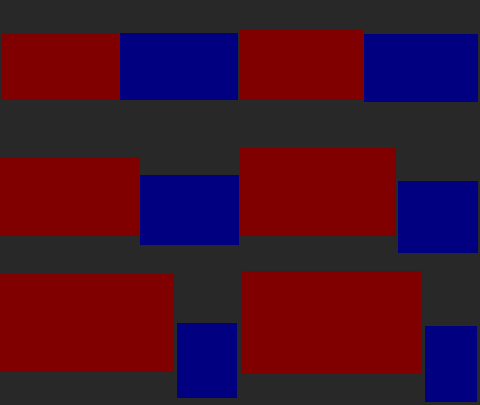

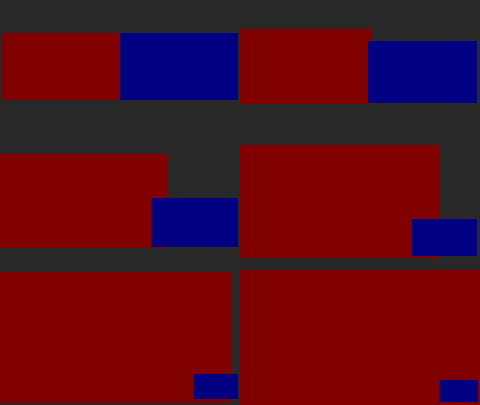
- c₁(A,B) ↔ c₂(B,A) — change layout and swap sources
Both the composite layout and the source assignment change simultaneously.
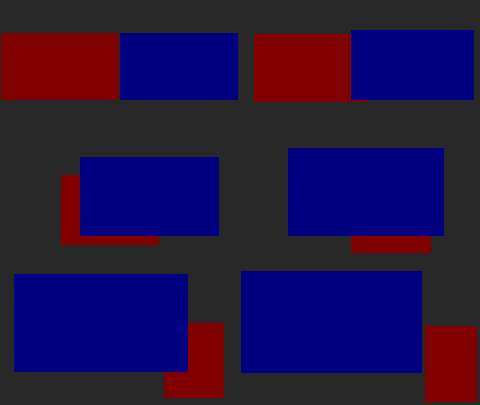

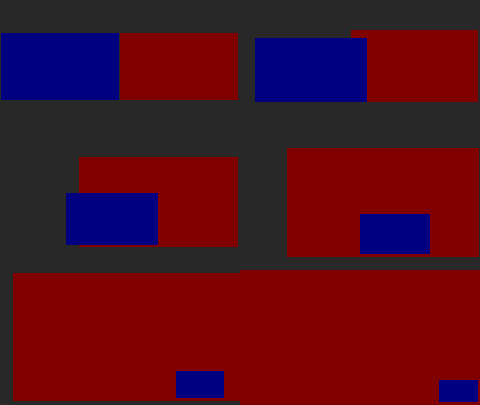
Configuring transitions
Transitions are defined in the [transitions] section:
[transitions]
; name = duration_ms, from_composite / to_composite
FADE      = 750, fullscreen / fullscreen
SBS_FADE  = 500, fullscreen / sidebyside
PIP_SWAP  = 600, pip / sidebyside / pip
Format:
<name> = <duration_ms>, <composite1> / [<intermediate> /] <composite2>
duration_ms — transition length in milliseconds. Two composites produce a linear interpolation; three or more use B-Spline interpolation.
Intermediate composites between
/separators are key frames inserted to enable z-order flips (see below).Missing reverse transitions are generated automatically.
Missing transitions between composites not listed here are inferred via equivalence and swap operations.
Auto-generated transitions
To keep configuration concise, voctomix applies the following operations automatically when building the transition table:
- Reverse (T⁻¹)
A transition c₁ → c₂ is automatically reversed to also cover c₂ → c₁.
- Swap (^)
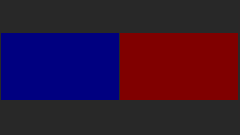
A composite c(A,B) can be swapped to c(B,A) by exchanging sources. This doubles the number of reachable composites without extra configuration.
- Equivalence
Composites where one source is entirely invisible (zero extent, zero alpha, or fully occluded) are treated as equivalent for transition matching purposes, reducing the number of transitions you need to configure manually.
- Phi (Φ) — z-order flip
For overlapping composites like pip, transitions that include a non-overlapping intermediate composite get the z-order flipped at the right frame automatically.
With a
sidebysideintermediate (recommended):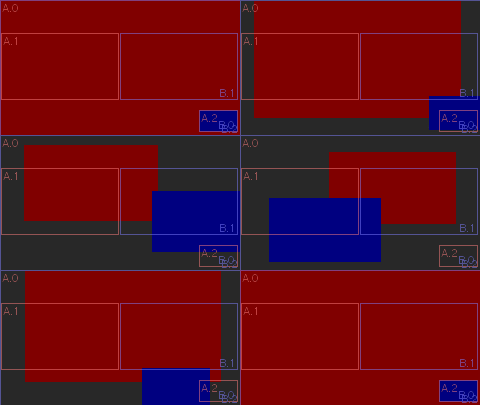
The key frames (A.0/B.2 = pip, A.1/B.1 = sidebyside) are visible as rectangles. At the first frame where B no longer overlaps A, the sources are flipped cleanly.
Without an intermediate composite (result is worse than a hard cut):

Configuration:
[transitions]
PIP_SWAP = 600, pip / sidebyside / pip
Transition operations: the Gamma (Γ) case
When you switch one source within a two-source composite to an external source (e.g. c(A₁,B) → c(A₂,B)), voctomix handles this as a three-source transition by first switching the hidden source and then doing a standard two-source transition. This is automatic and requires no extra configuration.
Using transitions from the GUI
Press the trans button (default: Space) instead of cut (Return)
to trigger a transition. voctomix selects the appropriate transition from the
table automatically based on the current and target composites.
The retake button (BackSpace) reverts the last mix action.
Transition tester
A standalone script renders all configured transitions to image/gif files for visual inspection:
python3 voctocore/tests/transitions/transition_tester.py \
    -i voctocore/default-config.ini
Command-line options:
usage: transition_tester.py [-h] [-m] [-l] [-g] [-t] [-k] [-c] [-C] [-r]
                             [-n] [-P] [-L] [-G] [-v]
                             [composite [composite ...]]

positional arguments:
  composite       composites to generate transitions between (default: all)

optional arguments:
  -h, --help      show this help message and exit
  -m, --map       print transition table
  -l, --list      list available composites
  -g, --generate  generate animation files
  -t, --title     draw composite names and frame count
  -k, --keys      draw key frames
  -c, --corners   draw calculated interpolation corners
  -C, --cross     draw image cross through center
  -r, --crop      draw image cropping border
  -n, --number    use consecutively numbered file names
  -P, --nopng     do not write PNG files (forces -G)
  -L, --leave     do not delete temporary PNG files
  -G, --nogif     do not generate animated GIFs
  -v, --verbose   print WARNING (-v), INFO (-vv) or DEBUG (-vvv) messages
Example — generate the pip-pip animation with all overlays:
python3 transition_tester.py -lvgCctk pip
Output:
1 targetable composite(s):
    pip
1 intermediate composite(s):
    fullscreen-pip
saving transition animation file 'pip-pip.gif' (pip-pip, 37 frames)...
1 transitions available:
    pip-pip
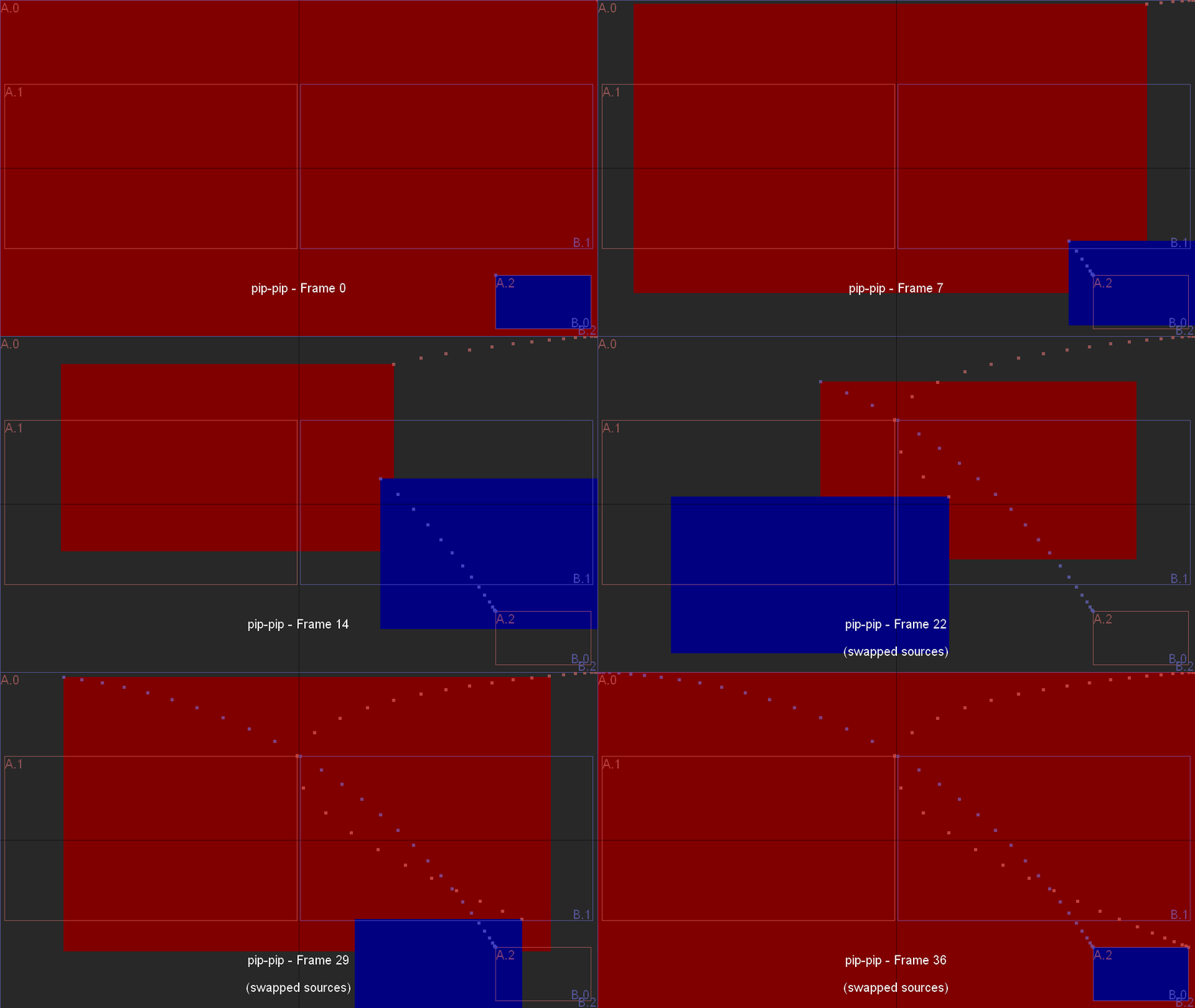
The annotated output shows key frames (marked *), the side-by-side
intermediate, and the --- FLIP SOURCES --- point where A and B are swapped.
Transition table
Print the full auto-generated transition table with -m:
python3 transition_tester.py -m
Each cell shows the transition name (including any Φ, ⁻¹, or ^ decorators)
used to animate between the row’s start composite and the column’s end
composite. Cells with def(…) are auto-generated default transitions;
cells with named entries were explicitly configured.